Live documents

Policies, certificates and supporting evidence.

Compliance centre

HMRC-aligned checking

Transparent payroll and reporting controls.

Product packs

Separate evidence for Umbrella, Joint, Sole and CIS.

Real people

Legal, compliance and payroll specialists behind the service.

Meet the team
The new Agency Portal

Setting a new standard in payroll compliance.

From April 2026, Joint & Several Liability places a greater onus on recruitment agencies to evidence what’s happening across their payroll supply chain, not just in principle, but in practice.

In response, we’ve developed a new Agency Portal designed to give agencies clear, verifiable, real-time visibility across the payroll lifecycle, from calculation through to confirmed settlement with HMRC.

Using intelligent automation and secure system integrations, the Portal allows agencies to see how pay has been calculated, what’s been reported, and when it’s been paid, supported by live HMRC validation and a robust audit trail.

The Portal moves beyond retrospective reporting, providing practical, defensible compliance through a system built for everyday agency use.

Clarity and control

What the Agency Portal can do for agencies

The Agency Portal gives recruitment agencies clear visibility across the payroll supply chain, bringing key information together in one place and making it easier to evidence compliance. All information is presented at a granular, agency-specific level, with secure, permission-based access.

Through the portal, agencies can:

  • View payslips, assignment schedules and Key Information Documents (KIDs) in one place
  • See a full breakdown of pay from assignment through to net payment
  • Verify PAYE tax and National Insurance calculations directly against HMRC
  • Access Real Time Information (RTI) submissions at agency and worker level
  • Confirm PAYE account status and payments made to HMRC
  • Retain a clear, auditable record for internal checks, client assurance, or HMRC enquiries
How it fits together

From payroll to proof, every pay week

Every pay week the Portal follows the same five steps, so the evidence is ready when you need it rather than something you have to build. The checks run automatically in the background once payroll has run, and you can run the PAYE account check yourself at any time.

  1. Paid and publishedPayroll runs. Each worker’s payslip, assignment schedule and Key Information Document appear in your portal.
  2. Checked against HMRCPAYE tax and National Insurance on every payslip are re-calculated with HMRC’s own tools and compared with what was deducted.
  3. ReportedThe RTI Full Payment Submission sent to HMRC is broken down to your agency and to each of your workers.
  4. Paid to HMRCThe real-time PAYE account checker shows what is due on the employer’s PAYE account and what has been paid.
  5. Kept as evidenceResults and screenshots are saved with the date, building an audit trail you can show a client or HMRC.
Compliance modules

Inside the Agency Portal, module by module

What each part of the Portal shows, what it does and why it matters under Joint & Several Liability. Screens marked Real screen come from the live Portal with personal data removed. The others are illustrations with sample data, and each clip shows the real screen. Click any screen to enlarge it.

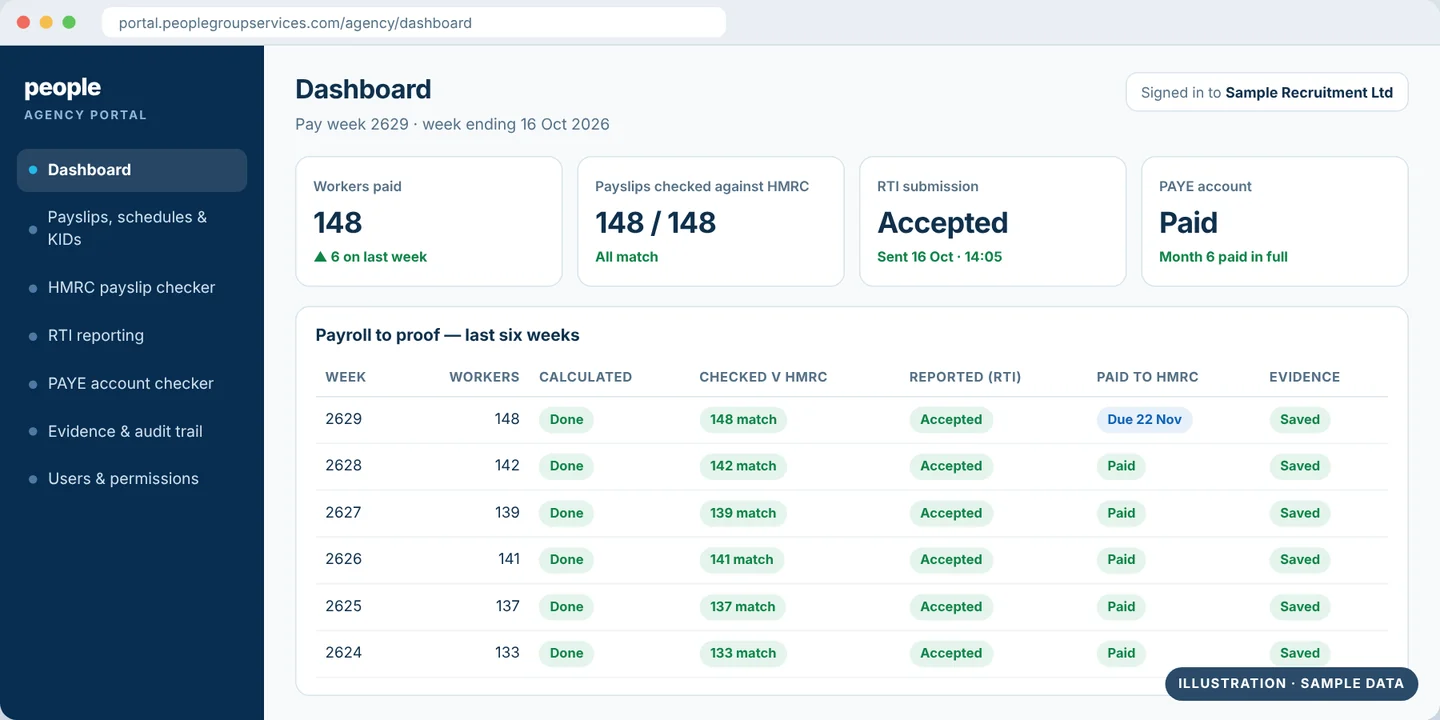
Agency Portal dashboard showing each pay week from calculation to evidence
Illustration Sample data — the clip shows the real screen
Module 1 · Dashboard

The fundamentals: your pay weeks at a glance

What you see
Your agency’s home screen. Intelligent dashboards and dynamic reports show each pay week for your own workers. Access is permission-based, so each user sees only what they should.
What it does
Automated background processes run the checks after every payroll, so the dashboard reflects live data rather than a report someone has to rebuild by hand.
Why it matters under Joint & Several Liability
HMRC expects ongoing monitoring, not a one-off check. The dashboard turns that into a quick weekly look rather than a project.
Payslips list with check results and a payslip open on the assignment reconciliation
Real screen Taken from the live Portal, with personal data removed
Module 2 · Payslips, schedules & KIDs

Every payslip, from assignment rate to net pay

What you see
Each worker’s payslip, assignment schedule and Key Information Document (KID) in one place. Open any payslip and the tabs take you to the assignment reconciliation, the payslip, the KID, its RTI (FPS) entry, the details and the calculation checks.
What it does
Gives you a full breakdown of pay, from the assignment rate through to net pay, at an individual level. You can filter by pay week, agency or account number.
Why it matters under Joint & Several Liability
You can see what each worker was actually paid and what was deducted. That’s the starting point for showing that pay in your supply chain is being handled correctly.
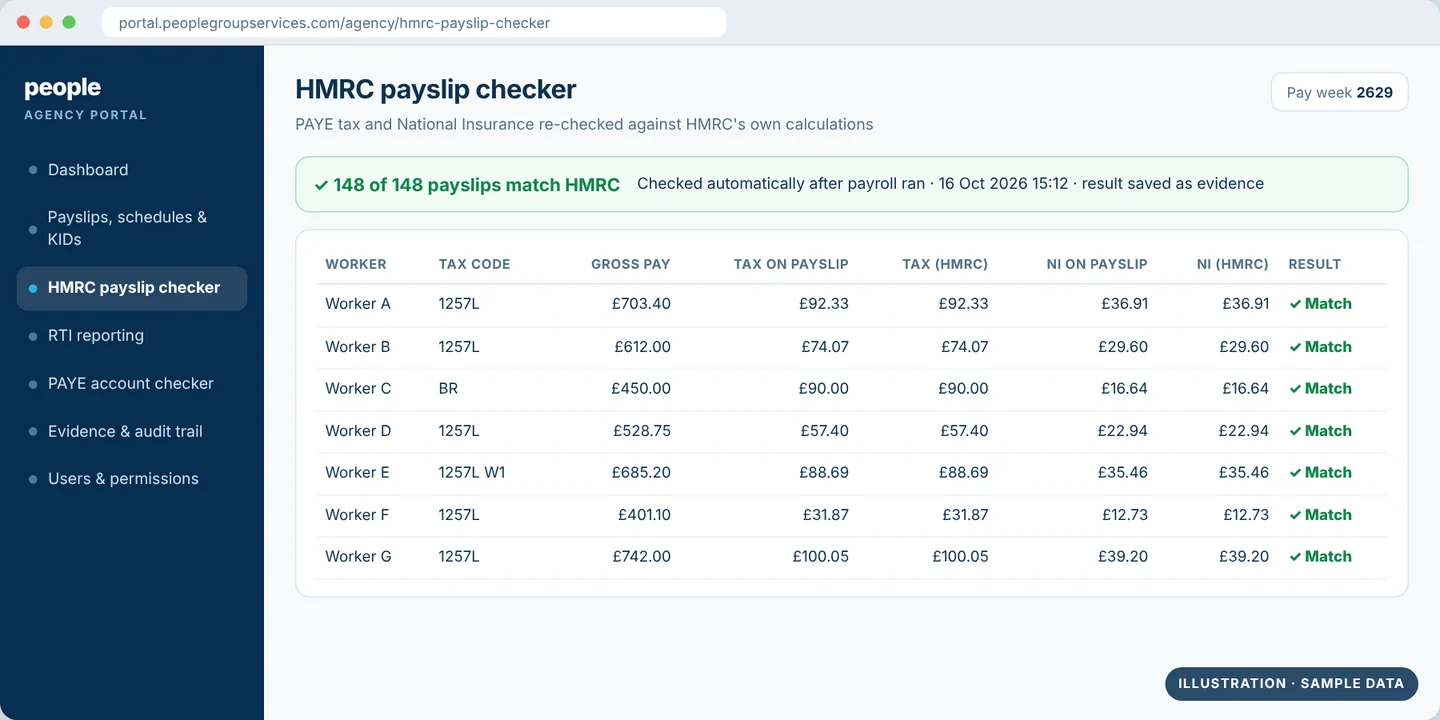
HMRC payslip checker comparing PAYE tax and National Insurance with HMRC’s figures
Illustration Sample data — the clip shows the real screen
Module 3 · HMRC payslip checker

PAYE tax and National Insurance, verified against HMRC

What you see
For every payslip, the PAYE tax and National Insurance deducted, side by side with the figures from HMRC’s own calculation tools and a clear result. In the payslip list, the Checks column shows the outcome for each worker. You can filter by Match, Mismatch, Error, Skipped or Not run.
What it does
Runs automatically after payroll, using precision checking tools to confirm that deductions, tax and net pay line up with what should be reported and paid. Each result is saved to a secure evidence trail.
Why it matters under Joint & Several Liability
Checking payslips yourself is slow, manual work. This gives you HMRC-aligned results for every worker, every week, and early warning if something doesn’t match.
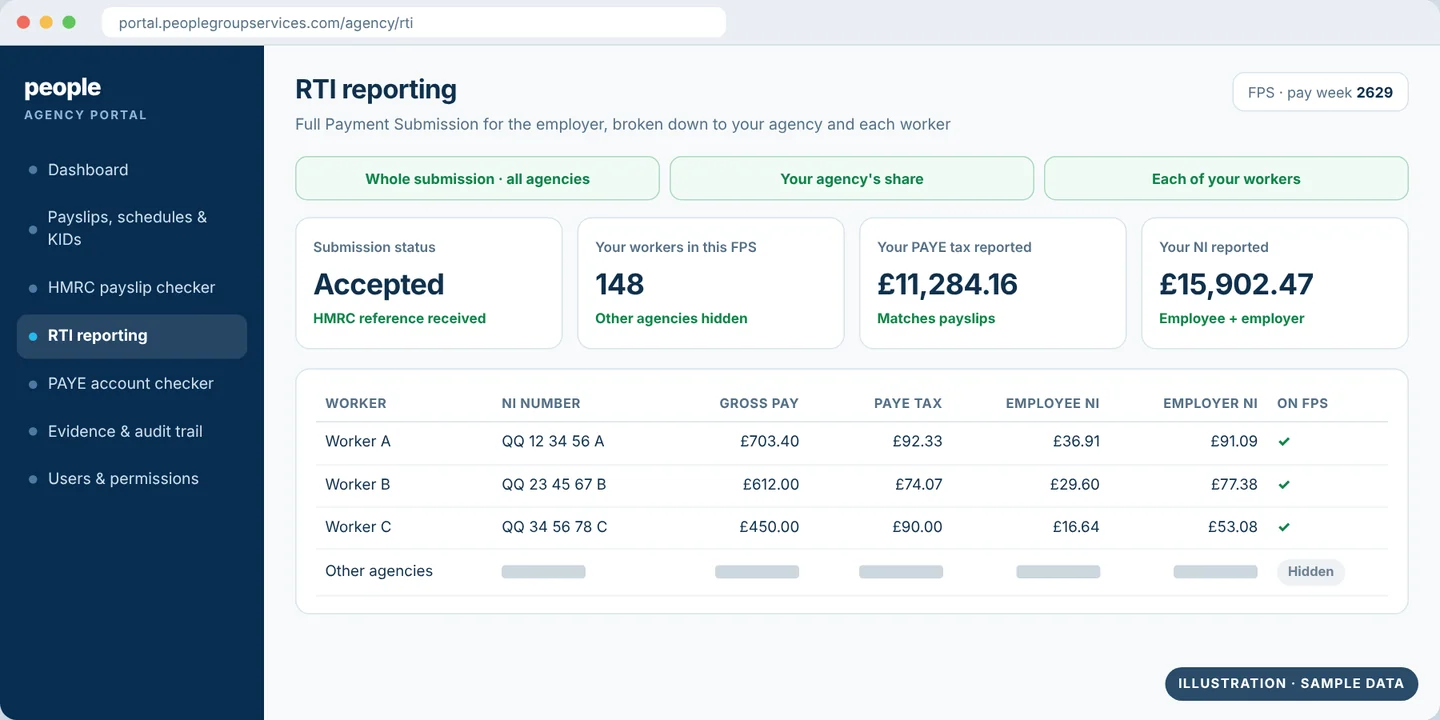
RTI Full Payment Submission broken down to one agency and its workers
Illustration Sample data — the clip shows the real screen
Module 4 · RTI reporting

RTI submissions, drilled down to your workers

What you see
The Full Payment Submission (FPS) sent to HMRC through Real Time Information (RTI). The Government Gateway shows one total for the whole employer; the Portal breaks that down to your agency and to each of your workers.
What it does
Lets you drill into your own contractors, payments and submissions. If a worker also works through other agencies, you see the full payment made to that worker, with the other agencies’ details redacted to keep them confidential.
Why it matters under Joint & Several Liability
You can reconcile what was reported to HMRC with what was paid and spot discrepancies quickly, rather than relying on a single headline figure.
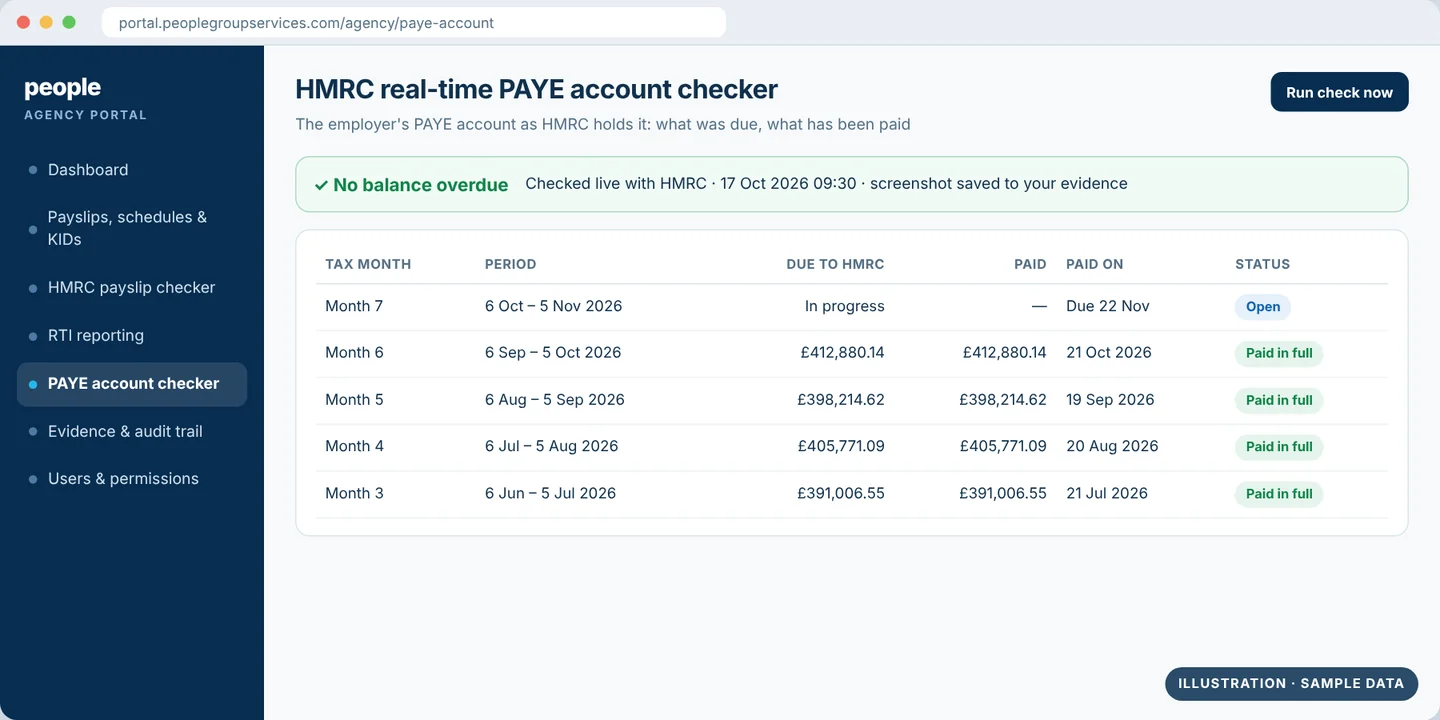
HMRC real-time PAYE account checker showing amounts due and paid
Illustration Sample data — the clip shows the real screen
Module 5 · PAYE account checker

Proof of payment, live from HMRC

What you see
The employer’s PAYE account as HMRC holds it: the account history, what is currently due and what has been paid.
What it does
You log in and run the check yourself, whenever you like. Each check gives you a screenshot for your records.
Why it matters under Joint & Several Liability
Calculating and reporting correctly is only part of the picture. Under Joint & Several Liability the question is whether the tax and National Insurance have actually been paid. Keep the screenshot as evidence alongside the RTI submissions and payment confirmations.
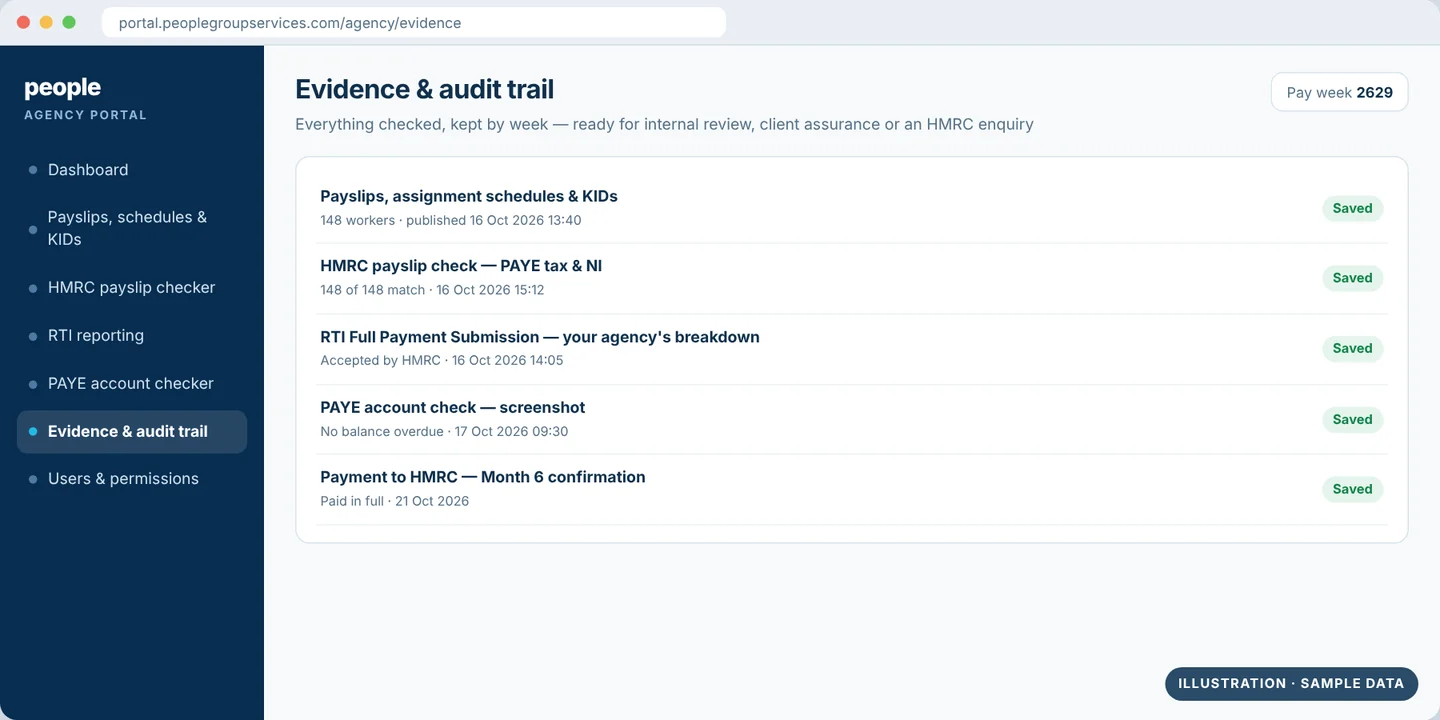
Evidence kept for one pay week: payslips, HMRC checks, RTI and PAYE account screenshot
Illustration Sample data — the clip shows the real screen
Module 6 · Evidence & audit trail

A clear record for clients, auditors and HMRC

What you see
Everything above, kept together by pay week: payslips and KIDs, HMRC check results, the RTI breakdown and PAYE account screenshots.
What it does
Gives you a clear, auditable record for internal checks, client assurance or an HMRC enquiry. If a question is raised, our team helps you pull together the audit trail, RTI reconciliation and payment evidence.
Why it matters under Joint & Several Liability
HMRC expects agencies to show reasonable, proportionate and ongoing steps to monitor their supply chain. This is the record that shows it.
Being straight with you

What the Portal can, and can’t, do

It can

  • Show how every worker’s pay was calculated, reported and paid
  • Verify PAYE tax and National Insurance against HMRC every pay week
  • Give early warning, so you can act before a problem grows
  • Give you a dated record of the checks you have made

It can’t

  • Give a statutory defence if PAYE tax or National Insurance goes unpaid. HMRC is explicit: it will pursue the relevant party or parties in the supply chain, however much checking has been done
  • Remove all Joint & Several Liability risk on its own

For agencies that want a 100% guarantee, there are structural options. Each one has its own legal, operational and commercial points to weigh up, so we talk them through one to one.

Explainer videos

How the Portal works in practice

The Agency Portal uses intelligent automation and secure integrations to carry out checks that would otherwise be manual and time-consuming.

Once payroll has run, automated background processes validate calculations, compare results directly with HMRC data, and store the outputs as evidence within the portal. This provides agencies with live information and reliable records, without the need to recreate checks manually or rely on assumptions.

Watch our explainer videos

To make this as transparent as possible, we’ve created a series of short, on-demand video clips taken from a recent webinar. These videos show exactly what agencies see when they access the portal, including payslip and KID visibility, HMRC-aligned calculation checks, RTI reporting, and PAYE account confirmation.

Each clip focuses on a specific element of the system, allowing you to dip in and view the areas most relevant to your role or supply chain.

We’ve also brought these videos together into a single downloadable PDF, which includes:

  • A short explanation of each video
  • Direct links to every clip

All nine clips

Support and partnership

Working closely with agencies

The Agency Portal is supported by our experienced client care and account management team, who work closely with agencies to ensure the solution fits their supply chain and operating model.

Support is not limited to the system itself. We provide:

  • One-to-one demonstrations of the portal
  • Onboarding and refresher training
  • Ongoing client care support
  • Guidance if queries are raised by HMRC or end clients

The most effective next step for many agencies is a one-to-one conversation. This allows us to understand your requirements in detail and agree the most appropriate and effective route forward for your business.

Next steps

If you’d like to see the Agency Portal in action or discuss how it could support your agency under Joint & Several Liability, we’d be happy to talk. Get in touch to request a demo or to discuss your requirements.

Help & advice

IR35 explained

There are a number of elements that will determine whether IR35 applies. Here we take a closer look at 3 areas that are key to identifying whether a PSC contractor can engage as inside or outside — and at HMRC’s CEST tool.

When does IR35 apply – three tests

The three tests for employment status taken from previous case law are: the Right of Substitution, Control and Mutuality of Obligations.

What is the Right of Substitution?

With regards to IR35, the right of substitution means the right for a Limited company to replace its representative subject to reasonable criteria. This is also important for the end client, to show that their requirement is for a professional contractor to provide a service and not just a specific individual.

What is ‘Control’?

Control is a very important factor for IR35 determinations. When, where and how you work and who controls this are the important factors.

If your client(s) decides where you work, when you work or how you carry out your work, it indicates that you’re operating in the same way as an employee. Your contract therefore, is within IR35.

If you have the ability to decide how a contract is completed and can complete the work according to your own schedule, it is likely this would be outside IR35.

What is Mutuality of Obligation (M.O.O.)?

When a company is obliged to provide paid work and a contractor is obliged to then accept and complete the work, this is considered mutuality of obligation – making the relationship more like an employee and employer.

Limited company contractors should never expect or receive mutuality of obligation. Self-employed workers are instead engaged on a contract for their services.

There is some ambiguity around this in terms of employment status tests, as some Mutuality of Obligation will exist in either a contract of service or a contract for services.

What is CEST and how does it work?

To help work out whether or not a contract falls within IR35, HMRC released an online tool just in time for the public sector implementation in April 2017. CEST has been updated since then, but reviews of the system have been somewhat mixed.

The CEST (Check Employment Status for Tax) tool determines whether or not “a worker on a specific engagement, should be classed as employed or self-employed for tax purposes.” The system collects information relating to the individual using multiple choice questions. Here are some examples:

  • Does the contractor provide their services via a limited company?
  • Can the worker provide a substitute (or have they already)?
  • To what extent does the client exert control over the contractor, e.g. can they move the contractor to a different role/location, decide how and when the work is done, etc.?
  • Is the contractor an ‘office holder’?
  • Does the contractor receive any ‘employee’ type benefits from the client?
  • What happens if the client is unhappy with the contractor’s work?
  • How is the contractor paid – fixed price, or by the time period?

The CEST tool processes all answers and determines whether or not the Intermediaries Legislation (IR35) applies to that particular engagement. A summary of all answers is provided, including notes on how HMRC has interpreted its understanding of IR35 as it relates to each employment status factor. If CEST deems you are caught, then the engager becomes responsible for operating IR35, and if not, you can carry on operating outside of IR35.

There are cases where the tool has been unable to make a determination on employment status at all and there are also some caveats listed within the summary report. HMRC say they will ‘stand by the result given unless a compliance check finds the information provided is not accurate.’ Added to this, HMRC will not stand by decisions where contrived contracts have been entered into.

Accreditation and policies

People Group Services is a Professional Passport audited member, an APSCo Trusted Partner and a TEAM Service Provider. Each has its own page explaining what it checks and how.

Trusted by agencies.
Chosen by contractors.